
Five ELD Driver
Five ELDAuto & Vehicles
4.561.00 Reviews
- Version
- 4.17.1
- Installs
- 50.00K
- Age Rating
- Everyone
Screenshots
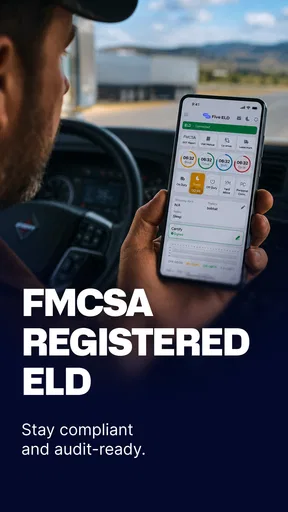
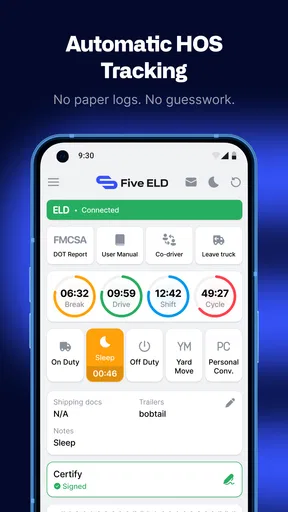
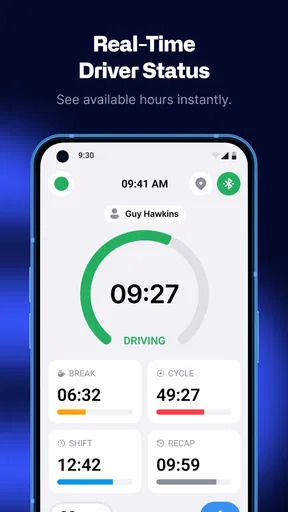
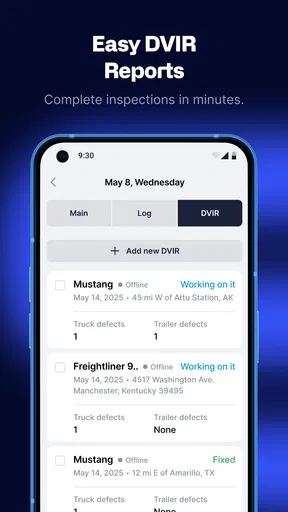
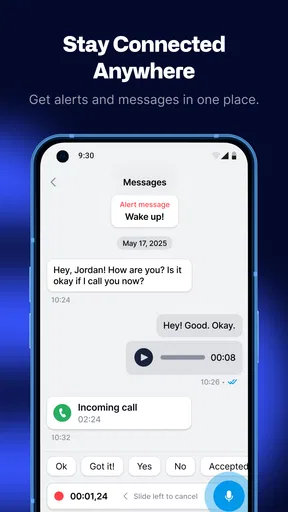
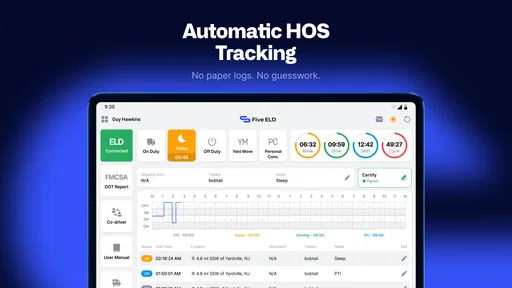
Our Review of Five ELD Driver
 Analysis by Appyee
When I first looked at Five ELD Driver, I approached it as a working tool rather than a typical consumer app. It belongs to the Auto & Vehicles category and is made by Five ELD for drivers who need a more organized way to handle fleet-related tasks from a mobile device. The free price makes it easy to consider, but the real question is whether it fits the way you drive, share equipment, and coordinate with other people.
My overall impression is that this is most useful when a driver and a fleet already have a clear routine. It is not an app I would install casually just to explore vehicle information. Its value depends on accurate use, consistent account handling, and a good understanding of who is responsible for each record. For an owner-operator, a small fleet, or a household where one vehicle is used for work, those details matter more than a flashy interface.
How Five ELD Driver fits into real shared driving
A realistic example is a household with one work vehicle used by two adults on different days. One person may drive during the week while the other helps with deliveries or takes over on a longer route. In that situation, the phone is not simply a personal device; it becomes part of a work process. Installing the app on a shared phone, or moving between phones without a clear routine, can create confusion about whose activity is being recorded and which driver is currently responsible.
I would treat the app as a driver-specific workspace, even when the vehicle belongs to the household. Before using it, I would agree on a simple handover routine: the active driver checks the account, confirms that the correct vehicle is selected, and avoids leaving the session open for the next person. That may sound basic, but it is one of the most important practical habits with any electronic logging tool.
The app’s store summary describes it as a suite of tools for managing a fleet, and that focus is clear in how I would position it. It is aimed at work-related driving rather than family trip planning, fuel-saving games, or general car maintenance. If your shared vehicle is used only for errands, you probably will not get much from it. If several people depend on that vehicle for professional driving, the organized workflow becomes much more relevant.
One useful way to think about shared use is to separate the vehicle from the account. The vehicle can be shared, but the driver’s identity and responsibility should not be casually mixed. I would avoid treating one login as a household profile where everyone records activity under the same name. That shortcut might feel convenient, yet it weakens the value of having a clear driver record in the first place.
There is also a human side to coordination. A family member who only occasionally drives the work vehicle may not know the same routine as the primary driver. I would give that person time to learn the app before a busy route, not during a rushed departure. A short practice session can reveal whether the phone is positioned safely, whether the right account is accessible, and whether everyone understands when the app should be checked.
Starting with the right account and device routine
Setup is less about downloading the application and more about defining boundaries. Five ELD Driver is free, and that removes one common barrier to trying it, but a no-cost installation does not replace the need for proper configuration. I would first identify the person or organization responsible for the fleet account, then decide which driver uses which credentials and device.
On a personal phone, I would keep the app separate from casual family use as much as possible. On a shared phone, I would create a written handover note outside the app that explains who should sign in, what to check before driving, and who to contact when something looks wrong. I would not rely on memory, especially when the vehicle changes hands after a long shift.
The current version is 4.17.1, so I would make sure the installed version matches the one expected by the fleet or supervisor before relying on it for regular work. Version consistency matters when several drivers report an issue: if everyone is using a different release, it becomes harder to tell whether a problem comes from the setup, the phone, or the software itself.
I also recommend checking the phone itself before blaming the app. A device with a nearly empty battery, unstable connectivity, an awkward dashboard position, or too many notifications can make an otherwise sensible workflow frustrating. The app should support the driving routine, not become another reason to handle the phone while moving. I would complete any required interaction while parked and keep the device mounted where it can be consulted without distraction.
One trade-off is that a dedicated work phone may be easier to manage than a family phone. The downside is the extra device to charge and maintain. Using a personal phone is simpler, but it increases the chance that another household member changes settings, signs into the wrong account, or interrupts the routine. For a small operation, that choice deserves a deliberate conversation rather than an automatic decision.
Coordinating drivers without mixing responsibilities
The strongest use case I see is coordination between drivers and the person overseeing the fleet. Instead of treating the app as an isolated tool on one phone, I would build it into a daily sequence. Before leaving, the driver confirms the active profile and vehicle. During the work period, the driver follows the agreed process. At the end, the driver makes sure the session is left in a state that will not mislead the next person.
This is especially important when a household member helps only part-time. Imagine one person completing the morning route and another taking the vehicle in the afternoon. The handoff should include more than the keys. They should discuss which driver is taking over, whether the phone is charged, and whether any unresolved issue needs to be reported. Five ELD Driver can be part of that communication, but it cannot fix an unclear division of responsibility.
A practical tip is to use the same verbal wording every time: “I am finished; you are taking over.” That sounds almost too simple, but consistent language reduces assumptions. The person receiving the vehicle should then verify the app rather than trusting the conversation alone. This is one of those small habits that becomes valuable when schedules change or several vehicles are involved.
For a fleet manager, the app may be more useful when paired with a simple internal checklist. I would record questions that drivers repeatedly ask, such as what to do after changing vehicles, how to report a device problem, and who reviews an unusual entry. The application can centralize the driver’s work, but the organization still needs a human process around it.
I would also avoid using a family group chat as the only place for important work instructions. Messages can be buried among shopping lists and personal conversations. A short, stable instruction sheet is easier to follow. The app handles the operational side; the household or fleet should handle clear communication and escalation.
What the age rating means in a household setting
Five ELD Driver has an Everyone content rating, which is appropriate for an app that deals with vehicle and fleet activity rather than entertainment content. Still, an age rating should not be confused with permission to operate a vehicle or manage work records. A younger family member may be able to see the app on a shared phone, but that does not mean they should use the driver account or change anything.
In my view, trust and responsibility are more important here than age alone. Anyone allowed to access the app should understand that entries connected with driving can matter beyond the phone screen. I would give access only to people who know which vehicle they are using, which account belongs to them, and when to ask for help.
This is another reason I would not leave a shared device unlocked with the app open. The risk is not that a child will find unsuitable content; the risk is that an innocent tap or account switch could affect a work record. Families often share tablets and phones casually, but a driver-management tool deserves a more careful boundary.
For teenagers who are learning about a family business, the app might be useful as something to observe during training, but I would keep actual responsibility with an authorized adult or designated driver. The application should never encourage anyone to handle the phone while driving, and a supervisor should explain that safety takes priority over checking a screen.
That distinction also helps with older relatives or occasional helpers who are comfortable driving but less comfortable with mobile software. I would not assume that familiarity with a vehicle automatically means familiarity with an ELD workflow. A calm demonstration while parked is better than handing over the phone and expecting the person to figure it out during a route.
Where it stands beside simpler alternatives
The usual alternative for a small operator is a paper process, a basic notes app, or a general fleet platform that combines many administrative functions. Paper can feel straightforward, especially for one vehicle, but it is harder to share consistently and easier to misplace. A notes app is flexible, yet it does not provide the same sense of a purpose-built driver workflow. A broad fleet platform may offer more business management depth, but it can also feel excessive for a small household operation.
Five ELD Driver sits in a practical middle ground for someone who wants a dedicated driver tool without immediately committing to a larger business system. I appreciate that focus because it keeps the app connected to the actual driving routine. At the same time, a focused driver app may not satisfy a company that wants extensive dispatching, maintenance planning, payroll, or detailed reporting in one place. In that case, the more comprehensive platform may be worth the added complexity.
The free price is another point in its favor for testing a workflow, but I would not choose it solely because it costs nothing. The better question is whether the app matches the fleet’s procedures and whether the people using it will keep information accurate. A paid alternative with stronger support or a broader management system could be a better fit for an operation where mistakes are expensive.
Its average rating is 4.5 from around 444 ratings, with 61 written reviews, and the app has passed 50 thousand installs. Those figures suggest that other users have found a reason to keep it in their toolkit, but they should be treated as context rather than proof that it will suit every fleet. Driver software is highly dependent on vehicle type, company procedures, phone habits, and the quality of the initial setup.
Small habits that make the experience more dependable
My first practical tip is to separate “before driving” checks from “after driving” checks. Before moving, confirm the correct driver and vehicle. After parking, review what needs attention and report problems through the agreed channel. This avoids turning the app into something that is constantly being handled on the road.
My second tip is to test a shared-device handoff on a quiet day. Have each driver sign in and out, identify the vehicle, and explain what they would do if the phone were unavailable. The point is not to invent a complicated emergency plan; it is to expose confusion before it affects a real route.
My third tip is to keep account boundaries visible. If several people use the same phone, a small label on the device or a written driver checklist can prevent the wrong person from being selected. I would never depend on a vague memory of who used the phone last.
A fourth insight is that the app should be judged over a complete work cycle, not after a quick launch. Try the process from preparation through handoff and end-of-day review. That is when friction appears: forgotten credentials, unclear responsibility, low battery, or a mismatch between what the driver expects and what the fleet manager needs.
Finally, I would give drivers a way to report uncertainty without embarrassment. If someone is unsure whether an entry is correct, silently guessing is worse than asking. A clear escalation habit protects the quality of the workflow and makes the app more useful over time.
Who should use it and who should look elsewhere
I would recommend Five ELD Driver to owner-operators, small fleet teams, and households where a work vehicle is shared by people who can agree on account and handoff rules. It is particularly sensible for drivers who want a dedicated mobile tool rather than a paper notebook or a general-purpose notes application.
I would be more cautious for someone who drives only for personal errands. The app’s fleet orientation may add steps without solving a real problem. I would also look elsewhere if your operation needs a single platform for dispatch, maintenance, payroll, and broader business administration. A specialized driver application can be useful without being the complete management system for every company.
Another reason to skip it is an unwillingness to maintain a consistent routine. No app can compensate for several people sharing one login, changing vehicles without checking, or using the phone while driving. If the team will not agree on basic boundaries, the software will probably create more uncertainty than clarity.
My household verdict
After considering it as both a driver tool and a shared-device responsibility, I see Five ELD Driver as a practical choice for people who need structure around fleet driving. Its free availability, Everyone rating, and focused purpose make it approachable, while the developer, Five ELD, has kept the product positioned around managing the driver’s side of fleet work.
I would install it when the household or business has a clear reason to track and coordinate professional driving. I would pair it with simple rules for accounts, handoffs, device charging, and safe phone use. Those rules are not optional extras; they are what allow any electronic driver tool to work reliably in a shared environment.
My final recommendation is straightforward: choose it if you want a dedicated driver workflow and are prepared to use it consistently. Do not choose it merely because it is free or because a good rating makes the decision feel automatic. For the right small fleet or shared work vehicle, it can bring useful order to daily driving. For casual family use or a company seeking an all-in-one management suite, a simpler tool or a broader alternative may be the better answer.
Verdict
Strengths of Five ELD Driver
- Simple interface makes daily log entries quick to complete.
- Supports compliance-focused recordkeeping for commercial drivers.
- Helps organize duty status changes in one accessible place.
- Can reduce paperwork compared with traditional paper logs.
- Useful for reviewing driving activity during inspections or audits.
Limitations of Five ELD Driver
- Setup may take time if vehicle and carrier details are complex.
- Requires a compatible device and reliable power during long trips.
- Incorrect entries can still create compliance issues.
- Some features may depend on the selected subscription or service plan.
- Drivers may need training to use every logging function correctly.
Similar Picks in This Category
View All
Android Auto
Google LLC4.1

maxim — order a taxi & food
PT. SITO4.7

Штрафы ГИБДД: проверка с фото
Pays LLC – Штрафы ГИБДД4.7

Номерограм – проверка авто
Авто Ассист4.8

Дром Авто
Дром4.9

Frequently Asked Questions
What is Five ELD Driver, and who is it designed for?
Five ELD Driver is a mobile application designed to help commercial truck drivers manage electronic logging device (ELD) records and comply with hours-of-service requirements. It can be useful for drivers who need to review duty status, record driving activity, inspect log information, and keep important compliance details accessible from an Android or iOS device, depending on the supported version and equipment.
Does Five ELD Driver require compatible ELD hardware or a company account?
In most cases, an ELD driver application is not intended to work completely on its own. Five ELD Driver may require compatible vehicle hardware, an account provided by a carrier or fleet administrator, and an active connection to the associated ELD platform. Before downloading, drivers should confirm which devices, trucks, operating systems, and login credentials are supported by their company or ELD provider.
Can drivers use Five ELD Driver to manage hours-of-service logs?
The app is primarily intended to help drivers interact with electronic logs and review hours-of-service information. Depending on the connected system, users may be able to view duty status, change available statuses, certify logs, inspect violations, and handle unidentified driving events. Features can vary by account configuration, so drivers should verify the exact functions enabled for their fleet before relying on the app.
Does Five ELD Driver work without an internet connection?
Five ELD Driver may continue recording or displaying certain information when connectivity is limited, but offline functionality can depend on the ELD hardware, application version, and fleet configuration. Synchronization, messaging, log transfers, and account updates may require mobile data or Wi-Fi. Drivers should avoid assuming that every feature works offline and should reconnect as soon as possible to keep records synchronized.
Is Five ELD Driver easy to use, and what should drivers check before downloading it?
The application is intended to simplify routine log management, but the experience may depend on the connected ELD system and the instructions provided by the carrier. Before downloading, check device compatibility, required Android or iOS version, Bluetooth or hardware requirements, account access, permissions, and subscription arrangements. Drivers should also learn how to certify logs, report errors, and contact support when records appear incorrect.
